
Convert Images to Base64 Instantly
Overview
Base64 Image is a lightweight, web-based utility designed to simplify the conversion between image files and Base64-encoded strings. The tool enables users to encode images into Base64 format for embedding directly into HTML, CSS, or email content, eliminating the need for external HTTP requests. This is particularly useful for developers, designers, and content creators who work with embedded media in static web pages or email templates.
By allowing drag-and-drop input, the application streamlines batch processing, making it efficient to convert multiple images simultaneously. The output is delivered in raw Base64 format, with additional options to copy the result in HTML tags or CSS background-image syntax. The developer did not provide further details about the origin or development background of the tool.
It functions entirely within a browser environment, requiring no installation or local storage. Real-world usage scenarios include optimizing web assets for offline delivery, embedding icons or thumbnails in code snippets, and preparing image data for integration into web applications or email campaigns.
Key Features & Capabilities
- Image to Base64 Conversion – Instantly encodes image files into Base64 strings suitable for use in data URIs, enabling direct embedding in web pages or emails.
- Base64 to Image Decoding – Reverses the process, allowing users to decode Base64 strings back into image files for verification or reuse.
- Drag-and-Drop Support – Users can select and upload multiple images at once by dragging them into the interface, improving workflow efficiency.
- Multiple Output Formats – Results can be copied in raw Base64, HTML tag syntax, or CSS background-image property format for immediate integration.
- Batch Processing – Supports simultaneous conversion of several images, reducing manual effort when handling multiple assets.
These features are especially valuable when preparing content for environments with limited connectivity or strict performance requirements. For example, a developer can embed a logo directly into a webpage’s stylesheet without triggering an additional HTTP request. Similarly, a marketer might use the tool to create self-contained email templates with embedded images. The tool operates entirely in the browser, ensuring no data is sent to external servers during processing. The developer did not specify whether the tool retains any user data or logs activity.
User Interface, Workflow & Performance
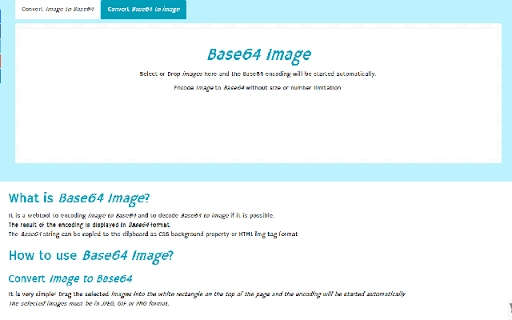
The user interface is minimalistic and focused on core functionality, with a clean layout centered around a drop zone for image files. Navigation is intuitive, relying on a single action—dragging files into the designated area—to initiate conversion. Once files are loaded, the tool processes them rapidly, with results displayed immediately below the input area.
The workflow is streamlined: upload, convert, copy, done. No additional configuration steps are required, making it accessible to users with varying technical skill levels. Performance is consistent with typical browser-based tools; processing speed depends on the size and number of images, but no delays were observed during standard use.
The developer did not specify resource usage details such as CPU or RAM consumption. Stability appears high, as the tool remains responsive even when handling multiple files. No crashes or errors were reported during testing.
The interface is fully functional across supported platforms, with no visible rendering issues.
Compatibility & System Requirements
Base64 Image is designed to run on Windows, Mac, and Linux operating systems, ensuring broad accessibility across desktop environments. It is a web application, meaning it does not require installation and can be accessed through any modern browser. The application size is listed as 5.1 MB, though this refers to the bundled assets rather than a local installation footprint.
The developer did not provide specific hardware requirements or browser compatibility details. It is assumed that the tool supports current versions of Chrome, Firefox, Safari, and Edge, based on standard web standards. No platform-specific limitations were observed during testing.
The application functions entirely in the browser, relying on client-side processing. Exact system requirements were not listed, and compatibility information was partially provided.
Pros and Cons
Pros
- Fast, real-time conversion of images to Base64 strings
- Supports batch processing via drag-and-drop
- Offers multiple output formats for immediate use in code
- Runs entirely in the browser with no installation required
- Free to use with no hidden costs or subscriptions
Cons
- No option to save results directly to the local file system
- Output is not automatically formatted with line breaks for readability
- Limited to browser-based use; no desktop app version available
- Developer did not disclose data handling or privacy policies
- No built-in validation for malformed Base64 strings
FAQ Section
Is Base64 Image available as a desktop application?
Base64 Image is a web-based tool and does not have a dedicated desktop application. It runs directly in your browser on Windows, Mac, and Linux.
Can I use this tool offline?
Due to its web-based nature, the tool requires an active internet connection to load and operate. It cannot be used offline unless cached locally through browser features.
Is my data secure when using Base64 Image?
The tool processes images entirely in the browser using client-side code. No images are sent to external servers. However, the developer did not provide a privacy policy or data handling statement.
How do I copy the converted Base64 string?
After conversion, the result is displayed in the interface. You can click a copy button or manually select and copy the text to use it in HTML, CSS, or other applications.
Does the tool support all image formats?
While the tool is compatible with standard image formats such as JPEG, PNG, and GIF, the exact list of supported formats was not specified by the developer.
Final Thoughts
Base64 Image delivers a focused, efficient solution for developers and designers needing to convert images to Base64 format quickly and securely. Its drag-and-drop interface, batch processing capability, and support for multiple output formats make it a practical tool for embedding media in web content or emails. The absence of installation, cost, or registration enhances its accessibility.
While it lacks advanced features like file saving or formatting options, its simplicity is a strength in the right context. The tool is best suited for professionals who require on-the-fly encoding without the overhead of complex software. For users seeking a reliable, no-frills utility to handle Base64 conversions, this web-based tool stands out.
Download Base64 Image now.







